Introducing AI Talent Rediscovery in Ashby to surface your strongest past candidates

Today, we're releasing AI Talent Rediscovery for Plus and Enterprise customers. It surfaces the most qualified candidates already in your Ashby database for any open role by using AI to understand criteria rather than relying on keyword matching.
For most recruiting teams, when a new role opens, the immediate instinct is to start sourcing from scratch, even when candidates who nearly made it to an offer, or who interviewed well for a different role six months ago, are already in the system.
The problem isn't that those candidates don't exist. It's that finding them is time-intensive, requires manual search and review, and misses anyone who described their experience differently than the job description expects.
How AI Talent Rediscovery works
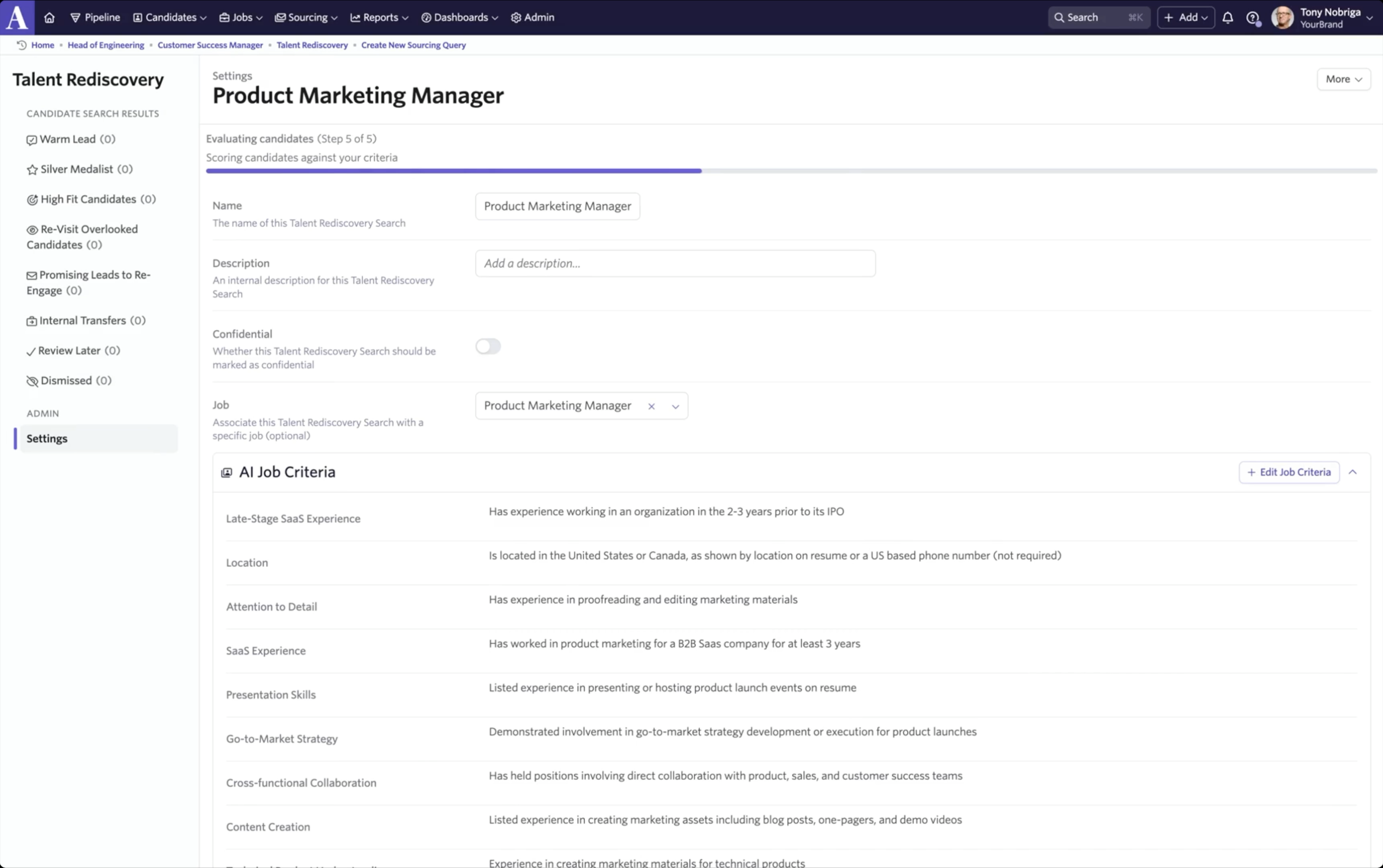
AI Talent Rediscovery evaluates candidates in your database against the criteria you define for a job, just like you would in AI-assisted application review. Instead of scanning for exact words, the AI reads resumes the way a recruiter would: it understands experience, infers relevance, and assesses fit against must-haves, should-haves, and nice-to-haves.
If you've already built out your job criteria, you have what you need to run a search.
Refreshing stale profiles
Candidate profiles can be incomplete or out of date if someone applied months or years ago. AI Talent Rediscovery includes automatic data refresh for any returned candidates: when available, it retrieves updated work history, location and education so evaluations stay accurate even when the original resume is sparse or outdated. This runs automatically and is performed on returned candidates at no additional cost.
Candidate signals and prioritized buckets
High-fit candidates can have different histories. Some are silver medalists, while others applied when a hire was already close. Having that context helps frame the review, reduces cognitive load, and speeds up your team's decision-making.
AI Talent Rediscovery surfaces behavioral signals for each candidate based on stage progression, scorecard ratings, email thread analysis, and AI classification. It then groups candidates into prioritized buckets so you know where to start.
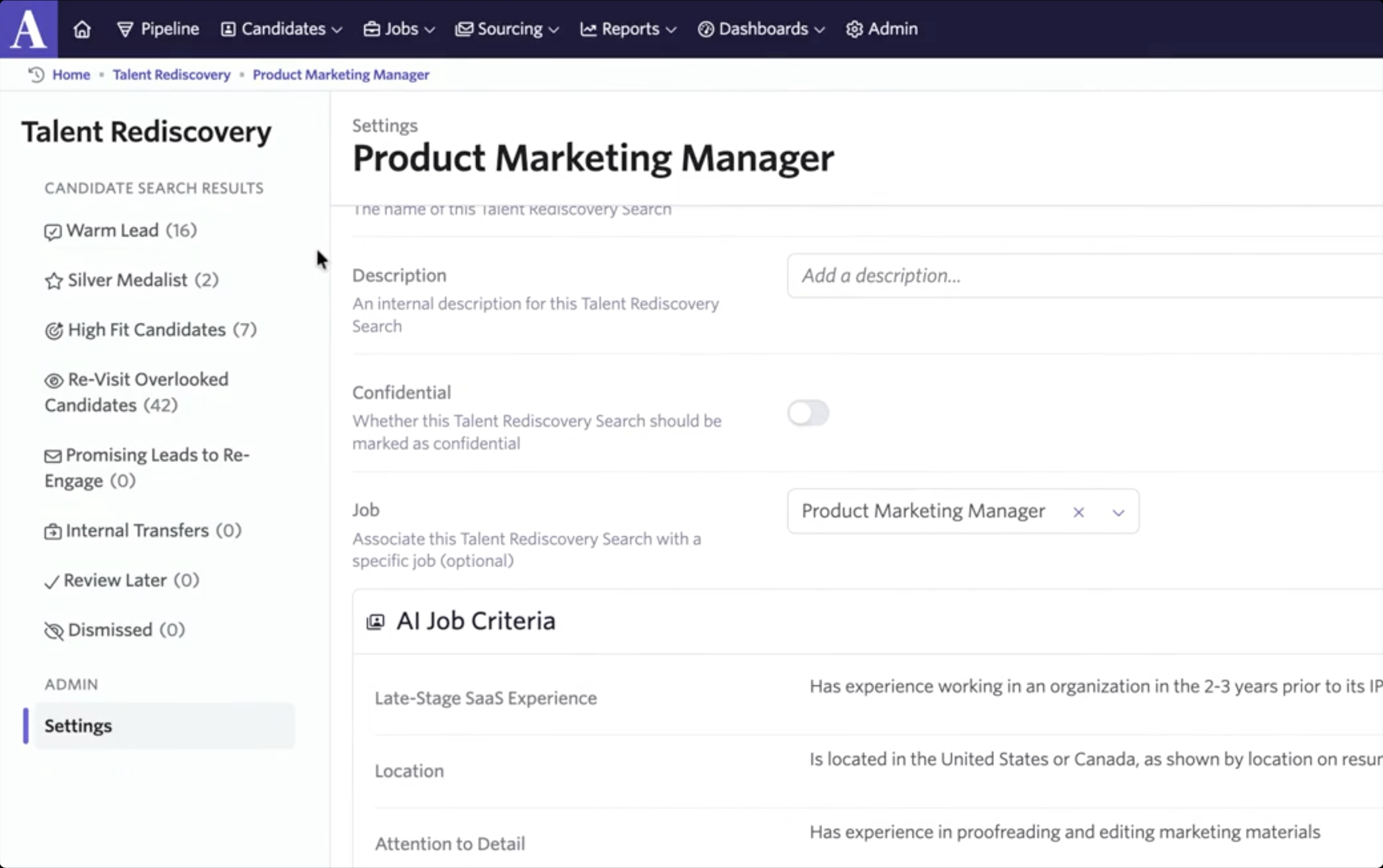
By default, AI Talent Rediscovery shows positive signals in priority order:
- Warm Lead: expressed interest through a sourcing form or hiring event but never interviewed
- Silver Medalist: reached an active interview stage with only positive feedback and 50%+ criteria match
- High Fit Candidates: 75%+ criteria match, progressed past screening, and no poor interview performance
- Re-Visit Overlooked: 75%+ criteria match but only reached pre-interview screen
- Promising Leads to Re-Engage: 50%+ criteria match, progressed past screening, and didn't ghost
- Internal Transfers: hired for a different role, judged suitable for this one by AI, and 50%+ criteria match
- Review Later / Dismissed: your own curated lists
It filters out negative signals, including Recently Rejected (within the last six months), Poor Fit, Poor Interview Performance, and Candidate Ghosted. The ghosting signal only applies when a candidate does not respond to non-automated outreach. Automated emails like NPS surveys never count against them.
A simple way to start is to begin with the highest priority bucket and work downward, spending time in each bucket until you stop finding strong candidates.
Reviewing candidates and calibrating with hiring managers
Clicking into any candidate opens a review panel with everything you need to decide whether to move them forward:
- The candidate's resume
- A criteria evaluation breakdown showing which requirements they meet and by what percentage
- A summary of their behavioral signals, full application history, and any previous scorecard feedback
Keyboard navigation lets you move through candidates quickly without leaving the panel.
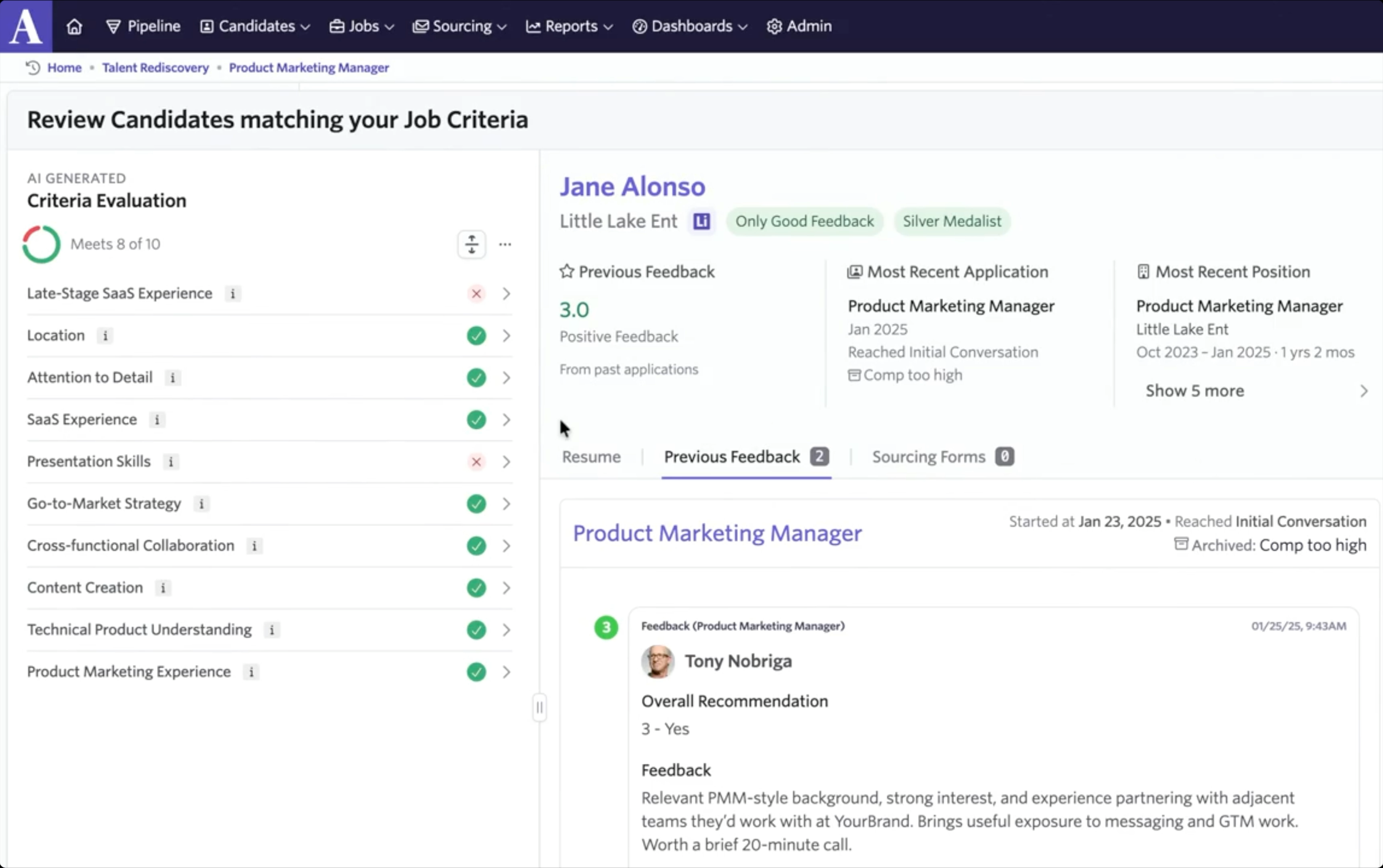
This workflow is especially useful for early-stage calibration with a hiring manager. Instead of debating an ideal candidate profile in the abstract, you can pull up real profiles in Rediscovery and use the criteria breakdown to pressure-test requirements. Add strong candidates to Review Later to build a shortlist in minutes.
Taking action
From the review panel, you can take direct action on any candidate: add them to a sequence, consider them for the role, add them to a project, or dismiss them. Bulk actions are also available for each of these for teams working through larger result sets.
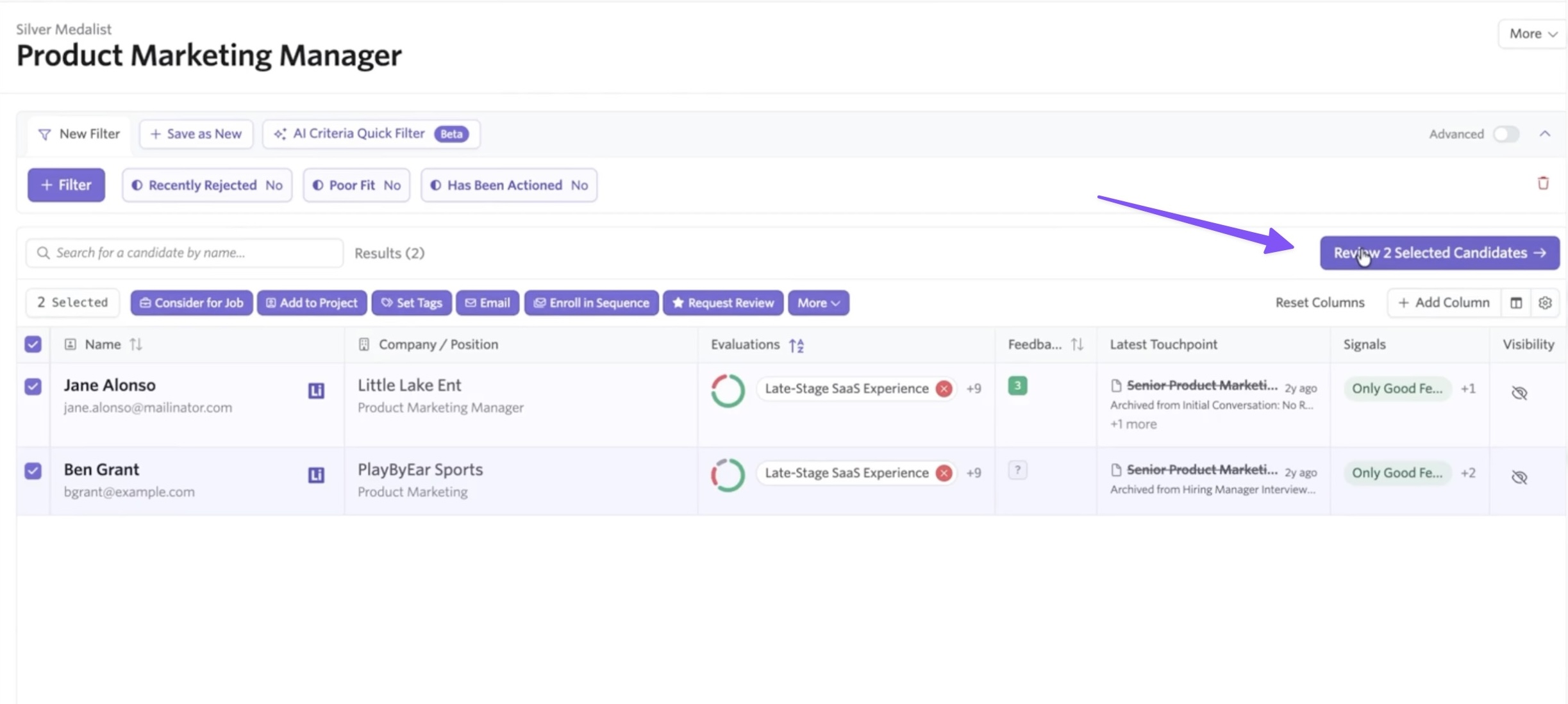
AI-personalized re-engagement outreach
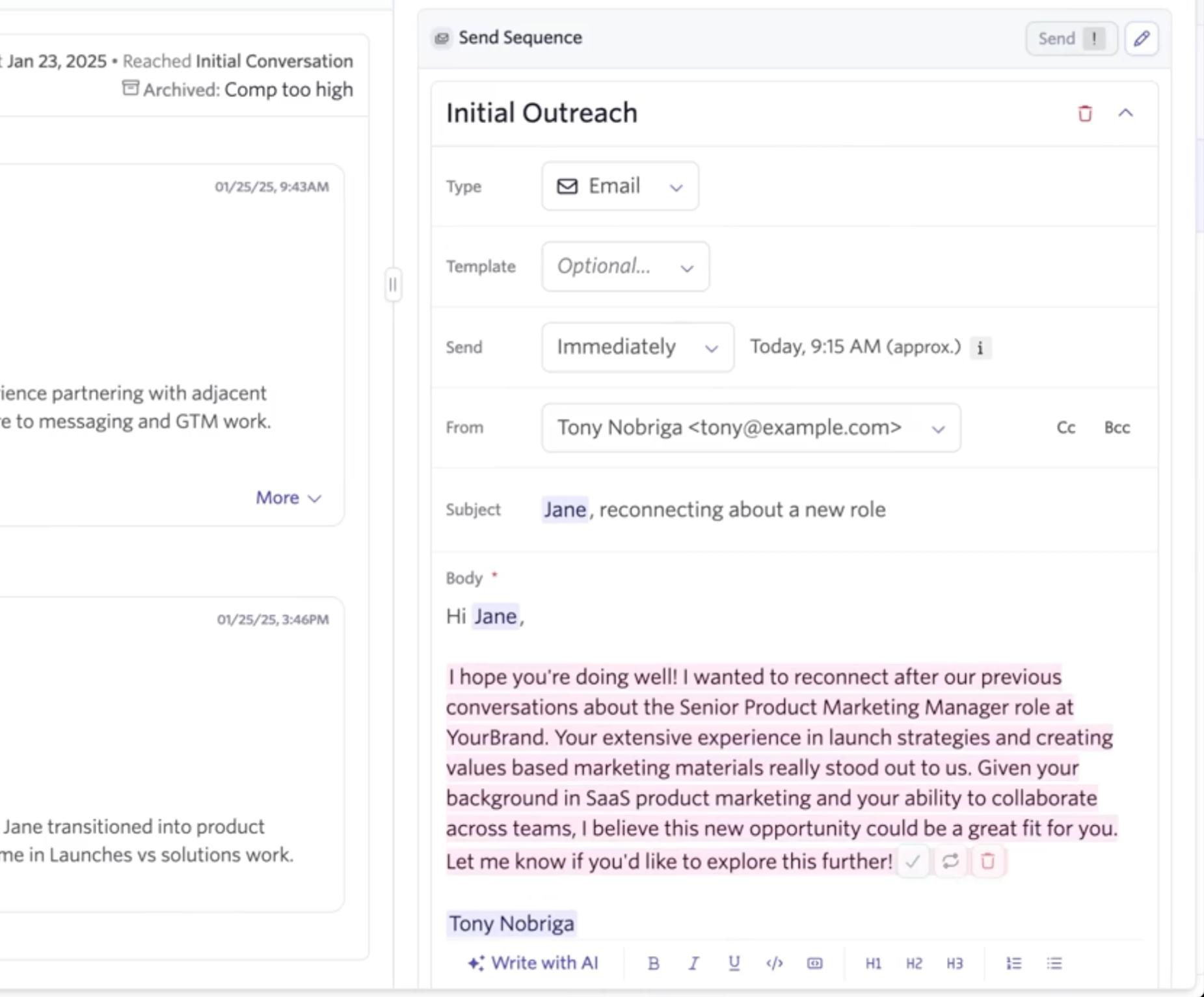
Re-engaging past candidates is different from cold sourcing. To do it well, you need to acknowledge the prior relationship, reference specific context, and explain why this role is a match.
AI Talent Rediscovery adds a re-engagement token you can use in sequence templates. When you send a sequence, the AI drafts personalized copy based on the candidate's Ashby history, including prior applications, interview notes, feedback, and past communications. You review and approve the draft before anything is sent.
You can also set a default Rediscovery sequence template at the org level to make the review-to-send process faster. Because the candidate's history lives in Ashby, the context needed to write a relevant, specific outreach message is already there.
Release and pricing details
AI Talent Rediscovery is available to customers on Plus and Enterprise plans. Pricing is 1 credit per candidate returned in your results, capped at 250 credits per search. You're only charged for candidates that appear in your buckets. Recently rejected candidates, poor fits, and candidates you've already acted on are excluded before credits are counted.
Getting started
To enable AI Talent Rediscovery for your organization, go to Admin > Organization Settings > Opt-In Features and toggle on "Talent Rediscovery." To enable it on a job, go to the job's criteria section and turn on AI Talent Rediscovery. Once active, the Rediscovery tab will appear on the job.
For best results, start with a complete set of job criteria before running a search. The quality of AI matching is directly tied to the specificity of your criteria.
Visit our help article for more details, or book a demo to see how AI Talent Rediscovery can help your team fill roles faster by re-engaging the best candidates already in your database.